Chapter 4 Corpus Analysis: A Start
In this tutorial, I will demonstrate how to perform a basic corpus analysis after you have collected data. I will show you some of the most common ways that people work with the text data.
4.1 Installing quanteda
There are many packages that are made for computational text analytics in R. You may consult the CRAN Task View: Natural Language Processing for a lot more alternatives.
To start with, this tutorial will use a powerful package, quanteda, for managing and analyzing textual data in R. You may refer to the official documentation of the package for more detail.
quanteda is not included in the default R installation. Please install the package if you haven’t done so.
## core
install.packages("quanteda")
## data, model, plotting
install.packages("quanteda.textmodels")
install.packages("quanteda.textstats")
install.packages("quanteda.textplots")
## loadding texts
install.packages("readtext")As noted on the quanteda documentation, because this library compiles some C++ and Fortran source code, you will need to have installed the appropriate compilers.
- If you are using a Windows platform, this means you will need also to install the Rtools software available from CRAN.
- If you are using macOS, you should install the macOS tools.
If you run into any installation errors, please go to the official documentation page for additional assistance.
4.2 Loading libraries
## loading libraries
library(tidyverse)
library(quanteda)
library(quanteda.textplots)
library(quanteda.textstats)
library(readtext)
library(tidytext)
## check current quanteda version
packageVersion("quanteda")[1] '4.3.1'4.3 Corpus Import
4.3.1 Building a corpus from character vector
To demonstrate a typical corpus analytic example with texts, I will be using a pre-loaded corpus that comes with the quanteda package, data_corpus_inaugural. This is a corpus of US presidential inaugural address texts, and metadata for the corpus from 1789 to present.
Corpus consisting of 60 documents and 4 docvars.
1789-Washington :
"Fellow-Citizens of the Senate and of the House of Representa..."
1793-Washington :
"Fellow citizens, I am again called upon by the voice of my c..."
1797-Adams :
"When it was first perceived, in early times, that no middle ..."
1801-Jefferson :
"Friends and Fellow Citizens: Called upon to undertake the du..."
1805-Jefferson :
"Proceeding, fellow citizens, to that qualification which the..."
1809-Madison :
"Unwilling to depart from examples of the most revered author..."
[ reached max_ndoc ... 54 more documents ][1] "corpus" "character"We create a corpus() object with the pre-loaded corpus in quanteda– data_corpus_inaugural:
After the corpus is created, we can use summary() to get the metadata of each text in the corpus, including word types and tokens as well. This allows us to have a quick look at the size of the addressess made by all presidents.
require(ggplot2)
corp_us %>%
summary %>%
ggplot(aes(x = Year, y = Tokens, group = 1)) +
geom_line() +
geom_point() +
theme_bw()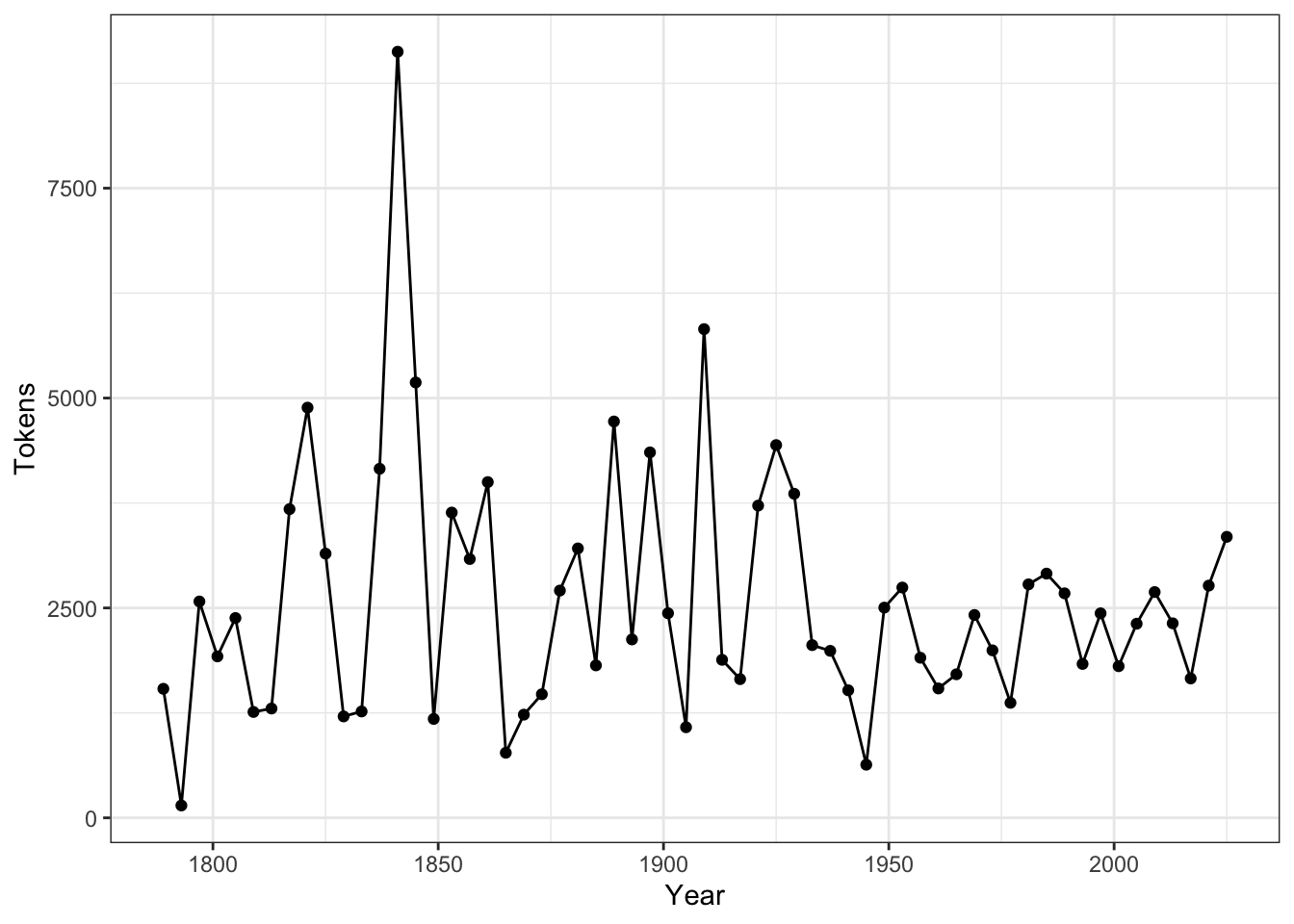
If you like to add document-level metadata information to each document in the corpus object, you can use docvars(). These document-level metadata information is referred to as docvars (document variables) in quanteda.
docvars(corp_us, "country") <- "US"The advantages of these docvars is that we can easily subset the corpus based on these document-level variables (i.e., a new corpus can be extracted/created based on logical conditions applied to docvars):
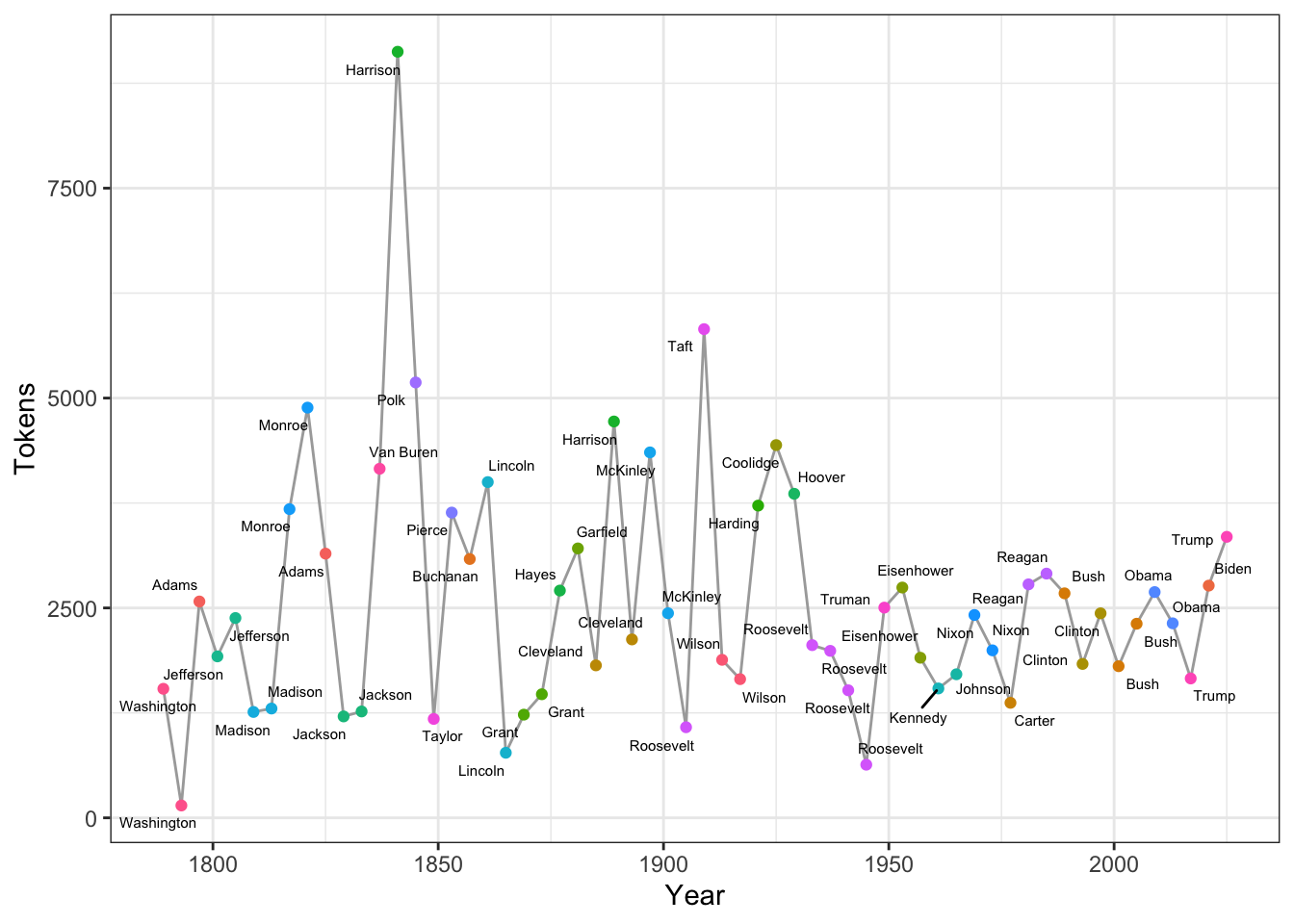
Exercise 4.1 Could you reproduce the above line plot and add information of President to the plot as labels of the dots?
Hints: Please check ggplot2::geom_text() or more advanced one, ggrepel::geom_text_repel()
4.3.2 Loading Own Corpus
Once text data is loaded into an R character vector, you can generate a
corpusobject usingquanteda::corpus(). This approach ensures a simple and transparent data-handling process.The
readtextpackage is designed for importing text files efficiently. Its primary function,readtext(), supports a wide range of formats and scales well for large datasets. For advanced configurations, please consult the package documentation.For optimal efficiency, store your text files within a single directory.
readtext()can import an entire folder in one step, streamlining the corpus construction process.The following code demonstrates a complete workflow – from importing files (using the
gutenberg.zipdata in thedemo_datadirectory) to generating a corpus summary: